Reolink Video Doorbell: Features, Setup, and How It Works
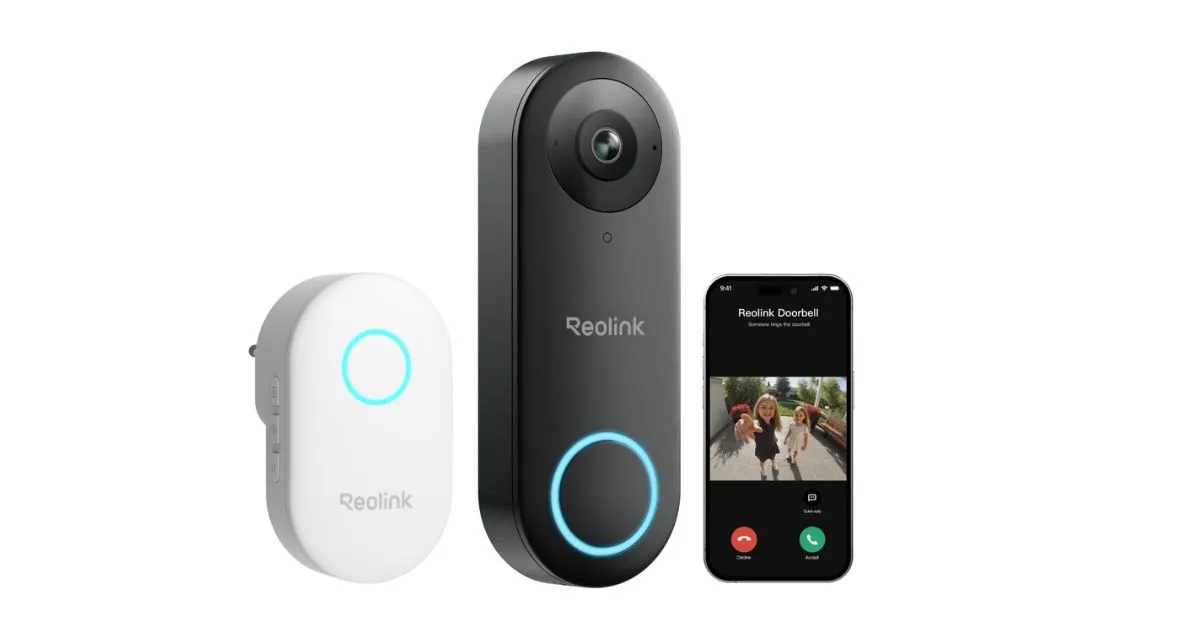
Table of Contents
A wired Wi-Fi camera can help you see who is at the door and manage visitor alerts from your phone with the Reolink Video Doorbell WiFi. It gives you a way to check home entry activity and choose how you want to respond when someone arrives. This guide helps you judge whether the camera fits your entry, plan its setup, and understand footage and alerts. Pre-motion recording means footage recording that begins before a motion event triggers recording. Use the model name on the box or device when checking setup details, since Reolink’s WiFi, PoE, and battery product names refer to different versions.
Key Takeaways
- The camera is a wired Wi-Fi model for entry monitoring.
- It supports two Wi-Fi bands and a wide field of view.
- You can choose local recording or optional cloud service.
- Motion, person, and package detection can prompt alerts.
- Chime compatibility depends on the doorbell version.
What Can the Reolink Video Doorbell WiFi Do?
The WiFi model records a 5MP image, with a wide diagonal view that includes both horizontal and vertical coverage. In practical terms, it captures a 180° diagonal field of view, with 135° horizontal and 100° vertical coverage. Its default resolution is 2560×1920 at 20 frames per second.
Image detail, field of view, and video format
The 5MP video resolution shows detail across the entrance, while the broad field of view can include more of the nearby walkway. H.264 video encoding compresses footage into a common video format. The WiFi model records at 20 FPS, or 20 frames each second.
The WiFi model is not the PoE or battery version; those names refer to different products.
The keyword reolink video doorbell poe points to a separate product search, not a power option for this model. That distinction matters when you compare model names or setup instructions.
Network, weather rating, and physical fit
The camera supports both 2.4 GHz and 5 GHz Wi-Fi, so it can join either type of home network. It also has a 10/100Mbps RJ45 Ethernet port. The IP65 rating means its housing is rated for dust and water exposure outdoors.
Its operating range is 14°F to 122°F. The body measures 133mm high, 48mm wide, and 23mm thick, and weighs 96g. Compare the camera’s dimensions with the space beside your door before choosing its mounting position.
How Do You Power and Install the WiFi Model?
If your entry has doorbell wiring, check its voltage and type before deciding whether to use it. The camera accepts 12–24V AC at 50/60 Hz or 24V DC. Both routes can work, but the supply must match the camera’s stated input.
Do not connect a supply until you have checked whether its output is AC or DC. The package includes an adapter for direct-to-outlet power, along with cables and mounting parts.
Choose a power route
You can use existing doorbell wiring or the included 1.5m power adapter. The box also contains a Reolink Chime, mounting plate, wedge, 1m network cable, extension cable, and jumper cable. These parts give you options for placement and connection.
Mount and connect the camera
Follow this five-step checklist to set up the reolink video doorbell wi-fi:
- Verify that the available supply matches the camera’s supported voltage and type.
- Choose existing doorbell wiring or the included adapter for direct-to-outlet power.
- Connect the camera to your 2.4 GHz or 5 GHz Wi-Fi network.
- Use the mounting plate and wedge to set the camera’s position.
- Test the live view and the included chime after setup.
For a wired doorbell installation, check the existing doorbell wiring before you begin. A doorbell power adapter gives you another route when you are not using those wires. Match the supply to the camera’s stated AC or DC input before connecting power.
Where Can Your Footage Be Stored and Reviewed?
You can record locally without a subscription, using a microSD card or another supported storage destination. The camera can save video to a Reolink NVR, Home Hub, FTP/NAS server, or card. Your choice can depend on whether you want a card in the camera or a separate storage device.
A microSD card supports up to 256GB, and local recording does not require a paid plan. Pre-motion recording captures footage from before a motion event triggers recording.
Local recording and recording modes
The camera supports three recording modes. Each mode changes when the camera saves footage.
| Recording mode | When it records | Supported option |
|---|---|---|
| Continuous | All day and night | 24/7 recording |
| Motion-triggered | When motion triggers recording | Motion-triggered recording |
| Scheduled | During set recording times | Scheduled recording |
Reolink microSD cards need Class 10 or higher read/write speed and FAT32 format. A card that misses either requirement may not work as intended. Local recording lets you keep video on supported devices without adding a cloud plan.
Cloud as an optional layer
As of 2026, the Reolink cloud service is optional and available only in selected countries and regions. The Standard Cloud Plan lists at USD 6.99 per month for up to five cameras, 30GB of shared space, and up to 30-day video history.
That plan includes thumbnail-rich push notifications. A video doorbell must appear on the app’s Classic-compatible list to join the plan. Format a compatible card as FAT32 and check that it is Class 10 or faster before using it.
How Do Visitor Detection and Alerts Work?
A visitor can trigger an alert, and you can respond through two-way audio without opening the door. The camera supports motion, person, and package detection. Custom motion zones let you focus activity alerts on selected areas.
Choose zones carefully, since activity outside your area of interest can still trigger alerts. The camera can send push notifications or email alerts with a detection snapshot.
Two-way audio lets you talk with a visitor through the camera and your phone. Noise reduction and echo suppression help keep the exchange clear. Quick replies let you send a response when you cannot speak live.
Set up alerts with these four choices:
- Choose which detection types to enable: motion, person, or package.
- Draw custom zones around the areas you want to monitor.
- Decide whether you want push notifications, email alerts, or both.
- Test two-way audio and quick replies from your phone.
For example, a zone that covers a busy sidewalk can catch passersby instead of only activity near your door. Tighten the motion zones if passing activity outside your entry keeps producing alerts.
Which Chimes and Smart-Home Tools Are Compatible?
Chime compatibility depends on the doorbell version, so check the version before pairing or buying another chime. Version matters because the plug-in Video Doorbell V1 uses a different chime standard from V2 and V3. One Reolink Chime pairs with one doorbell at a time.
A chime sold with a doorbell comes pre-paired. Reolink chimes work only with Reolink Video Doorbell cameras, so the brand alone does not confirm compatibility.
Match the chime to its doorbell version
| Doorbell version | Compatible chime | Maximum paired chimes |
|---|---|---|
| Plug-in Video Doorbell V1 | Chime V1 only | 1 |
| V2 | Chime V2 or Chime Plus | 5 |
| V3 | Chime V2 or Chime Plus | 5 |
A doorbell can support several chimes, but each chime can pair with only one doorbell. Check the version label before choosing a replacement. The included Reolink Chime has 10 selectable ringtones and five volume levels.
Use voice assistants and live view
The Reolink Video Doorbell WiFi works with Alexa and Google Assistant. Google Assistant can show the live view on a Google Nest Hub or Chromecast-enabled TV. That gives you another way to check the entry from a compatible screen.
For a separately purchased Chime V1, plug it into a power socket first. Hold its Settings button for five seconds until it beeps and its blue status light turns on. Then press the doorbell to complete pairing.
To pair Chime V2, open the doorbell’s Settings, then tap Chime and Reolink Chime in the app. Tap the plus icon, then hold the chime’s Settings button until it beeps twice and its light turns blue. Select the detected chime in the app to pair it.
Check warranty coverage
The WiFi model has a two-year limited warranty. New Reolink products outside the Professional Series have the same two-year limited warranty. Registration adds six months of coverage.
Do not choose a chime by brand alone; the doorbell version determines which chime works.
Check the model labels on both devices before purchasing a replacement or additional chime.
Conclusion
The right setup is the one that fits your entry’s power and the way you want to keep footage. Your existing wiring may suit the camera, or the included adapter may fit your setup better. Before installation, make sure your chosen recording destination works for your needs.
For home entry monitoring, decide which visitor alerts matter to you and where saved video should go. Those choices shape how useful the camera will be after installation. Before mounting the camera, decide where recordings will be stored and choose the visitor alerts you want to receive.
FAQ
Can the Reolink Video Doorbell WiFi connect to a router that only supports 2.4 GHz?
Yes, the Reolink Video Doorbell WiFi supports a router that uses only 2.4 GHz Wi-Fi. The camera also supports 5 GHz networks, so you can use either band when your router offers both. Choose the band with reliable coverage near your entry. Your router does not need to support 5 GHz for the camera to connect.
Can you use a microSD card larger than 256GB?
No, the camera supports microSD cards up to 256GB. Reolink also requires a card with Class 10 or higher read/write speed and FAT32 format. A card above the supported capacity is outside the camera’s stated limit. Check both the card size and format before recording to it.
Do you need a subscription to save video locally?
No, local video recording, viewing, and management do not require a subscription. You can record to a microSD card or another supported local storage destination. Reolink cloud service is an optional layer, and it is available only in selected countries and regions. Cloud storage and local recording are separate choices.
Can the doorbell send an email with a visitor snapshot?
Yes, the doorbell can send an email with a detection snapshot, as well as push notifications. The snapshot helps you see what prompted the alert without opening the live view first. You can choose email alerts, push alerts, or both. Detection settings and motion zones affect which activity can trigger a notice.
Can one Reolink Chime pair with two doorbells at once?
No, one Reolink Chime pairs with one doorbell at a time. That limit differs from the number of chimes one doorbell can support. Video Doorbell V1 supports one chime, while V2 and V3 support up to five. Pairing more than one chime with a doorbell does not let a single chime serve two doorbells.
Can Google Assistant show the live view on a television?
Yes, Google Assistant can show the doorbell’s live view on a Chromecast-enabled TV or Google Nest Hub. The Reolink Video Doorbell WiFi supports Google Assistant, as well as Alexa. A Chromecast-enabled television gives you a larger screen for checking the entrance. The live view feature does not change the camera’s storage options.