Reolink Video Doorbell PoE: Benefits, Installation, and Features
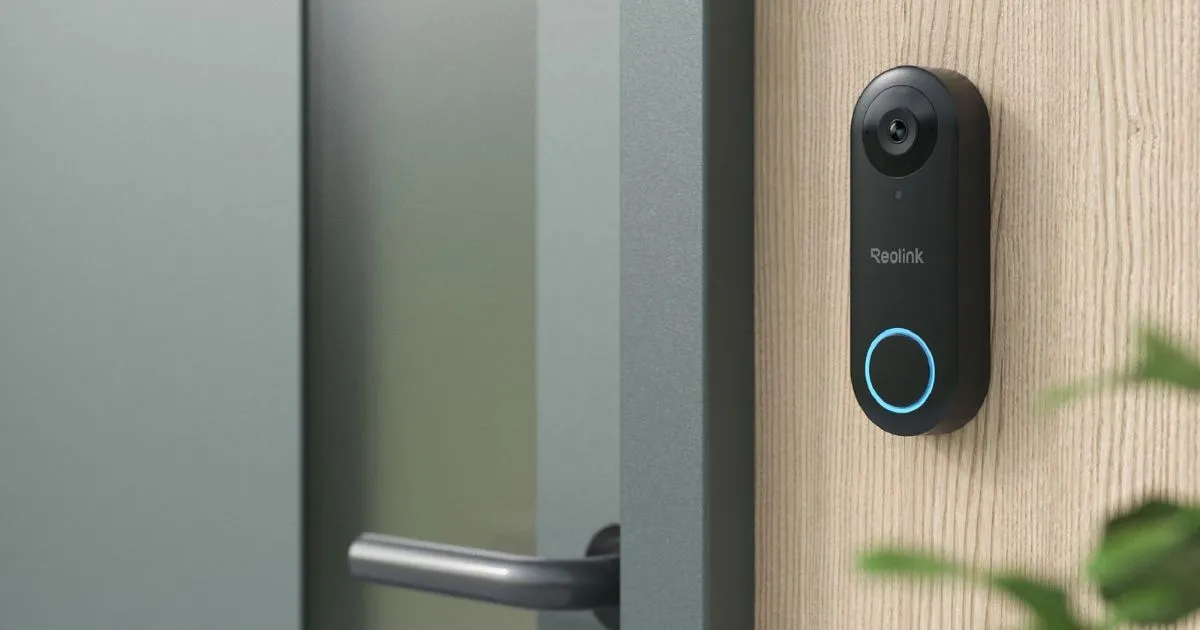
Table of Contents
A wired doorbell camera, such as the Reolink Video Doorbell PoE, can suit you if you want a fixed connection at the front entrance rather than relying on a battery-powered device. A dependable entrance camera can help you see visitors and check activity near your door. Your setup still needs to fit the home and the way you use it.
This guide helps you assess image quality, visitor features, installation needs, storage choices, and practical limits. A wired design will not suit every entryway, especially if its cable route or power source is hard to arrange. Start by checking whether you can provide a suitable wired network connection at your entry.
Key Takeaways
- One Ethernet cable can carry data and power with PoE.
- The white and black versions have different horizontal and vertical views.
- Person detection and two-way audio support visitor interaction.
- Local recording is available without a monthly recording fee.
- Check power, mounting space, and recorder compatibility before installation.
- Reolink Cloud is optional and has regional limits.
How Does the Reolink Video Doorbell PoE Connection Work?
With PoE, one Ethernet cable can carry both network data and power to the camera. Power over Ethernet (PoE) is a wired connection that carries both electrical power and network data over one Ethernet cable. A PoE switch or PoE NVR can supply both through Cat5e or Cat6 Ethernet.
A standard PoE Ethernet run can reach up to 100 meters (328 feet). The doorbell can also use Ethernet for network access while a power adapter or existing doorbell wiring supplies power.
Keep the Ethernet run within the standard 100-meter limit for PoE.
The separate-power option still uses a cable for network access. It does not turn the doorbell into a Wi-Fi camera. That distinction matters if you are comparing a reolink video doorbell wifi setup with a wired model.
A Wi-Fi connection can avoid an Ethernet run to the device, while a battery model can reduce wiring further. Each approach has different setup needs. For this doorbell, a fixed Ethernet connection links the camera to your network and may also carry its power.
Think about the route between the entry and your network equipment before choosing a connection method. Walls, long runs, and the location of your switch or NVR can affect where the cable needs to go. Cat5e and Cat6 are both supported cable types.
How Clear Is the Video, and How Wide Is the View?
The doorbell records 5-megapixel video at a default 20 frames per second. That detail can help you inspect activity, though resolution alone cannot promise that you will identify every face at every distance.
The white and black models trade horizontal coverage for vertical coverage. Both record at 2560 × 1920 pixels, and both have a 180-degree diagonal field of view.
| Field-of-view measurement | White model | Black model |
|---|---|---|
| Horizontal | 100° | 135° |
| Vertical | 135° | 100° |
| Diagonal | 180° | 180° |
The field of view describes how much of the scene appears in the frame. The 20-frame-per-second setting means the camera captures 20 images each second. That rate can make movement easier to follow, but it does not remove blur or distance limits.
The camera uses a 1/2.7-inch CMOS image sensor and an f/2.0 lens with a 2.26 mm focal length. Those parts shape how light enters the camera and how it frames the scene. The listed view angles offer a clearer comparison for most placement decisions.
For an entry with a wide porch, the black version has a wider horizontal view. The white version gives more vertical coverage, which may better suit a tall, narrow area. Consider the path visitors take and the parts of the doorway you want in frame.
Both versions share the same diagonal figure, but that number does not show how coverage is split. Check the separate angles against your entryway instead of relying on one combined measure. Choose the color version by the direction of coverage you need, not by the shared diagonal figure alone.
Which Visitor Features Can You Use?
Person detection can help distinguish a person from other motion-triggering activity. Motion detection responds to movement, while person detection focuses on human figures. The doorbell also offers ways to get alerts and respond.
Its two-way audio lets you speak and listen through the doorbell. Noise reduction and echo suppression help manage sound during a conversation. These tools can make a short exchange easier when you are not at the door.
- Person detection for activity recognized as a person.
- Motion detection for movement in the monitored view.
- Visitor notifications to alert you to activity at the entrance.
- Custom motion zones to select areas for monitoring.
- Quick replies for responding with prepared messages.
- Two-way audio for speaking and listening through the doorbell.
Person detection and motion detection serve related but different purposes. Movement from other causes can trigger motion detection, while the person feature is meant to narrow attention to people. Notifications let you know about activity, and quick replies offer a response when speaking live is not convenient.
Two-way audio gives you a way to talk with a visitor and hear their reply through the device. Noise reduction and echo suppression are part of that audio feature. Your experience can depend on the sounds and conditions around the entry.
Custom motion zones let you focus monitoring on selected parts of the camera view. That can help you leave out areas you do not need to watch. Set custom motion zones around the parts of your entrance you actually want monitored.
How Do You Power and Install the Doorbell?
You can power the doorbell through active PoE, supported AC wiring, or 24 V DC. Choose the power path that matches the equipment and wiring at your entry.
Ethernet provides network access when AC or DC supplies the power. The power ratings differ, so check the available supply before connecting the device.
Powering it through PoE, AC, or DC
The doorbell uses IEEE 802.3af active PoE at 48 V. It can also use 12–24 V AC at 50/60 Hz or 24 V DC.
| Power method | Supported rating | Network connection |
|---|---|---|
| Active PoE | IEEE 802.3af, 48 V | Ethernet |
| AC power | 12–24 V AC, 50/60 Hz | Ethernet |
| DC power | 24 V DC | Ethernet |
Most mechanical doorbell power systems rated 16 V AC, 50/60 Hz, 30 VA are compatible. That rating does not mean the existing mechanical chime will keep working with this doorbell.
Connecting existing wiring and handling the chime
When you use existing mechanical doorbell wiring, the mechanical chime must be bypassed with the supplied jumper cable. You can also connect the doorbell directly to the transformer.
Bypassing the old mechanical chime disables it. The doorbell does not work with an existing mechanical chime, so the Reolink Chime is the recommended pairing.
Before installation, make these three checks:
- Confirm the voltage available at the doorbell wiring or power source.
- Identify whether the existing wiring powers a mechanical chime.
- Plan to use the supplied jumper or connect directly to the transformer if required.
A reolink video doorbell wi-fi search may point you toward a wireless network setup, but this model still needs Ethernet for network access. Its AC or DC option changes the power source, not the network connection.
If you are unsure about the existing transformer or wiring, have a qualified installer check it before connecting the doorbell.
Where Can Recordings Go, and How Can It Record?
You can record locally without paying a monthly fee for recording. Local recording saves footage to storage you control rather than requiring a cloud plan.
The doorbell supports motion-triggered, scheduled, and 24/7 recording. A microSD card slot accepts cards up to 256 GB, and recorded motion clips include six seconds before motion detection.
Local recording without a monthly fee
You can choose among four local recording destinations:
- A microSD card installed in the doorbell.
- A Reolink NVR.
- A Reolink Home Hub Pro with a pre-installed 2 TB hard drive.
- An FTP/NAS server.
The microSD card is a direct option if you want storage in the doorbell itself. The 256 GB limit applies to that card slot. An NVR, Home Hub Pro, or FTP/NAS server offers a different place to keep footage.
Cloud service is separate from local recording. You do not need a paid cloud plan to use the listed local recording options. The service may still appeal if you want its features, which are covered later.
Choosing a recording schedule
Motion-triggered recording saves clips when the camera detects movement. Scheduled recording lets you set times for recording. With 24/7 recording, the camera captures footage continuously rather than waiting for motion.
Six seconds of pre-motion footage can show what happened just before the detection event. This can add context to a clip, such as someone approaching the door. It does not change the three recording modes available.
Continuous recording needs a suitable local storage destination and a schedule that fits your needs. Event clips can use motion triggers, while scheduled recording can target certain times. Choose a recording schedule that matches whether you want event clips or continuous coverage.
Which Reolink NVR Models Are Compatible?
Check the exact NVR model and its hardware version before planning to use it with the doorbell. Compatibility depends on the supported model list and, for some devices, the hardware version.
Supported NVRs can use the doorbell’s smart person and visitor detection. The table lists five supported models; check applicable hardware-version requirements for your specific unit.
Supported NVR models
| NVR model | Compatibility | Setup note |
|---|---|---|
| RLN8-410 | Supported | Check applicable hardware version |
| RLN16-410 | Supported | Check applicable hardware version |
| RLN36 | Supported | Check applicable hardware version |
| RLN12W | Supported | Check applicable hardware version |
| NVS8 | Supported | Check applicable hardware version |
Other supported models include NVS16, NVS36, NVS12W, RP-PN8, and RP-PN16. Model names can look similar, so compare the full name on your recorder rather than relying on appearance.
What to check if setup fails
If a supported NVR will not add the doorbell or does not work normally, updating it to the latest official firmware is a recommended troubleshooting step. Firmware is the software that runs on the recorder.
A recorder that is not on the supported list may still have basic network functions, but it does not support the doorbell’s smart person and visitor detection. A firmware upgrade does not add those features to an unlisted NVR model.
Check both the model label and its hardware version before setting up the recorder. If the model is supported, current official firmware is a useful step when setup fails. Do not assume a firmware update will add smart detection to an NVR model that is not on the supported list.
Will the Doorbell Fit and Withstand Your Entryway?
Measure the mounting area before drilling, since the doorbell is 133 mm high, 48 mm wide, and 23 mm thick. Space at the entry affects whether the body and its mount can fit without blocking nearby trim.
The doorbell weighs 96 g and has an IP65 weatherproof rating. Its stated operating temperature range is 14°F to 131°F.
Weather protection and operating limits
The IP65 rating describes the device’s weather protection, while the temperature range sets its stated operating limits. Check both against the location where you plan to mount it. A spot exposed to weather or temperatures beyond that range may not suit the device.
Consider the position of nearby doors, trim, and other fixtures as you compare the measurements. The mounting area must leave room for the doorbell and its mounting hardware. A narrow post or a crowded door frame may limit placement.
Dimensions and included accessories
The package includes these six groupings:
- A 1 m network cable.
- One Reolink Chime.
- Extension cables and jumper cables.
- A mounting plate.
- A wedge.
- A quick-start guide.
The package also includes a two-year limited warranty. The stated term is two years; check the warranty terms for details about its coverage.
Use the mounting plate and wedge to plan the final position before drilling. The supplied network cable is 1 m long, so consider whether its length suits the planned connection. Check that the chosen mounting position stays within the stated operating-temperature range.
What Practical Issues Should You Expect at Night and With Motion Alerts?
Night images can be affected by nearby reflective surfaces, as a bright spot on a door appeared in one test. That test image also showed a darker surrounding area, while faces remained identifiable.
Those results describe one test, not every entrance or installation. A nearby surface can change how infrared night vision appears in the camera view.
Motion alerts can also need adjustment. In one test, the out-of-box motion settings caused false-positive alerts. Adding a one-second alarm delay helped reduce notifications in that test.
Entryways differ in lighting, surfaces, and movement around the door. A reflective door may affect the night image, while other motion near the camera may trigger alerts. Results from one setup do not guarantee the same behavior at your home.
A one-second alarm delay helped reduce false notifications in the tested setup. It may be worth trying if the default alerts are too frequent, then judge the effect at your own entrance. If alerts are too frequent, try a one-second alarm delay and check whether the change improves notifications at your entrance.
Do You Need Reolink Cloud for Recording and Alerts?
You do not need a subscription to record or manage Reolink cameras. Reolink Cloud is optional, and the service is available only in selected countries and regions.
The 2026 Standard Cloud plan is listed at USD 6.99 per month. It includes up to 30 days of cloud video history, up to five compatible cameras, and 30 GB of shared cloud space.
What works without a subscription
You can manage Reolink cameras and record without a paid subscription. Local recording does not require a monthly fee. Cloud storage is a separate option, not a condition for using the cameras.
That distinction matters if you only want a way to keep recordings without a recurring cloud charge. A subscription may add cloud features, but it is not needed to record locally or manage the camera.
Optional cloud plans and image alerts
The Standard Cloud plan also includes push notifications with thumbnails. Its listed allowance covers up to five compatible cameras and 30 GB of shared cloud space. Those limits apply to the plan as a whole.
The free Rich Notification Plan gives Video Doorbell Series devices up to 25 rich image notifications per day. Additional notifications arrive without images unless you upgrade to an unlimited plan.
Cloud storage and rich image notifications are distinct features. The Standard plan lists cloud video history and push notifications with thumbnails, while the free plan sets a daily image-notification limit. Check whether Reolink Cloud is available in your region before choosing a plan.
Which Smart-Home and Network Protocols Does It Support?
The doorbell supports five named network protocols: RTSP, RTMP, ONVIF, FTP, and SMTP. These protocols let compatible devices and software exchange different kinds of network data.
RTSP and RTMP relate to media streaming, while FTP transfers files and SMTP sends email. ONVIF supports interoperability among compatible IP devices.
RTSP is commonly used for streaming media control. ONVIF can help compatible IP products work together, but support for the standard does not promise that every app or device will connect.
Verify that the specific software or device you plan to use supports the protocol you want to connect through.
FTP and SMTP serve different tasks from streaming protocols. FTP is used for file transfer, while SMTP handles email. Your software must support the right protocol for the feature you want to use.
If you are comparing a reolink battery video doorbell with a wired option, protocol support is one point to weigh alongside power and network needs. Do not assume that a particular third-party app supports every listed protocol.
Check the protocol list for the software or device you plan to connect. A shared standard only helps when both ends support the needed features. Verify that the specific software or device you plan to use supports the protocol you want to connect through.
Conclusion
The Reolink Video Doorbell PoE is a practical option when your entry can support its wired connection and power requirements. Local recording is available without a monthly recording fee, which can suit you if you prefer to keep footage on local storage.
Before choosing a setup, check the wiring at your entry and the exact model of any NVR you plan to use. Those checks can help you avoid choosing a power path or recorder that does not fit your home. Before you buy, confirm your wiring and recorder compatibility against the installation you plan to use.
FAQ
Can the Reolink Video Doorbell PoE connect to Wi-Fi?
No, the doorbell uses Ethernet for its network connection. It can receive power separately through supported wiring or a power adapter, but that does not make its network connection Wi-Fi. Ethernet still carries the network data, even when another power source runs the camera. Plan for a wired network path when choosing where to install it.
Does the Reolink Video Doorbell PoE work with a mechanical chime?
No, the existing mechanical chime does not work after the required bypass. For existing mechanical doorbell wiring, bypass the chime with the supplied jumper cable or connect the doorbell directly to the transformer. The included Reolink Chime is the recommended pairing. Check how your current wiring is set up before you begin the installation.
How much footage does the doorbell record before motion?
The doorbell records six seconds of footage before motion is detected. That pre-motion clip can show what happened just before the camera marked an event, such as a person approaching the entrance. It is included with motion-triggered recording and gives the event a little more context than footage beginning at detection.
Can I record continuously without paying for a subscription?
Yes, the doorbell supports 24/7 recording, and local recording has no monthly fee. Continuous capture requires an appropriate local storage destination, such as a compatible microSD card, NVR, Home Hub Pro, or FTP/NAS server. Choose a destination that suits your setup and keep enough storage available for the footage you want.
What size microSD card does the Reolink Video Doorbell PoE support?
The doorbell supports a microSD card with a maximum capacity of 256 GB. The card installs in the doorbell’s microSD slot and can hold local recordings. If you plan to use a larger storage setup, consider one of the other local recording destinations instead. Check the card capacity before you buy it.
How far can the Ethernet cable run for PoE?
The standard maximum Ethernet cable distance for PoE is 100 meters, or 328 feet. That figure gives you a planning limit between the doorbell and the PoE equipment. Cable installation conditions can affect a real run, so the route and setup matter. Keep your planned cable path within the standard limit.
Does the doorbell send image notifications for free?
Yes, Video Doorbell Series devices get up to 25 rich image notifications per day on the free Rich Notification Plan. Additional notifications arrive without images unless you upgrade to an unlimited plan. The daily limit applies to image alerts, not to the camera’s ability to detect activity. Reolink Cloud is available only in selected countries and regions.