
Wyze Video Doorbell V2 Reviews: Pros, Cons, and Ratings
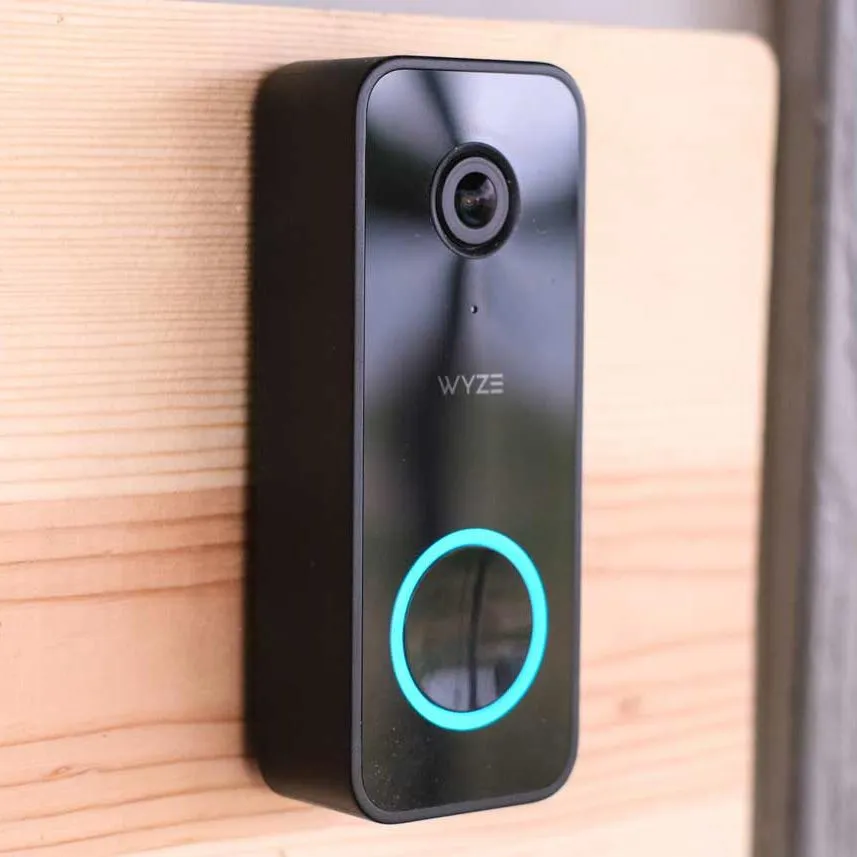
Table of Contents
The Wyze Video Doorbell v2 is a sensible budget choice for homeowners who want a wired camera and can accept its installation and recording tradeoffs. It suits people seeking front-door security and package delivery monitoring without a battery-powered setup.
Its appeal rests on a useful mix of camera features and flexible recording choices. The tradeoff is clear: hardwiring limits where it can go, while some recording features depend on the option a household chooses. This review weighs its practical benefits against those limits.
Key Takeaways
- Best suited to homes with compatible existing wiring.
- Records at 2K resolution and offers a broad viewing area.
- Supports continuous microSD recording without a subscription.
- Cloud plans add event history and longer event videos.
- Chime compatibility varies by design and model.
- Check the entryway fit before placing an order.
Treat it as a fit for a home that already meets its wiring needs, not as a battery-powered upgrade.
Wyze Video Doorbell V2 Reviews: How Sharp Is the Video?
The camera records at 2K, while its field of view determines how much of the porch fits into the image. Field of view means the horizontal and vertical area visible to the camera.
Its 2K resolution is 2048 x 1536 pixels, which can show more image detail than a lower-resolution recording. The field of view describes coverage, not sharpness, so these measurements answer different questions.
2K detail and frame rates
The Wyze Video Doorbell v2 security camera records a visitor as well as the space around the door. More pixels can help preserve details in the image, but they do not guarantee a clear view of every face or package.
Distance, lighting, and camera angle all affect the detail a viewer can make out. A person near the camera may appear clearer than someone at the edge of a long walkway.
A 2K image can show more detail, but it cannot make distant faces clear by itself.
This makes placement part of image quality, not just an installation choice. A camera aimed too far toward a wall may waste part of its view, while a very wide approach can leave visitors small in the frame.
Field of view across a porch
The listed horizontal and vertical angles show how much space the lens can capture in each direction. The diagonal figure combines those directions into one wider measure.
| Measurement | Listed value | Unit or direction |
|---|---|---|
| Resolution | 2048 x 1536 | pixels |
| Horizontal field of view | 135° | horizontal |
| Vertical field of view | 103° | vertical |
| Diagonal field of view | 166.8° | diagonal |
The broad view can include a visitor and nearby porch space, though it cannot show areas blocked by walls or door frames. A nearby side wall may take up more of the frame than expected.
Check the intended mounting position against the actual doorway and approach path before judging coverage.
How Does It Capture Motion Before and After an Event?
A motion clip can include 3-6 seconds of pre-roll when the doorbell is hardwired. Pre-roll video captures footage from just before the camera detects a motion event.
Pre-roll depends on a hardwired installation, so it is not a feature to expect from a battery setup. It can add context, such as a person beginning to walk toward the entry before the event starts.
The listed frame rate is 20FPS during the day and 15FPS at night. FPS means frames per second, or how many still images make up each second of video.
Those rates describe capture speed, not a promise that every clip will show a face clearly. Movement, distance, shadows, and the camera’s angle can all affect usable detail.
A motion-event recording may be more useful when it shows what happened before someone reached the door. For example, it could capture a visitor approaching from the path rather than only the moment at the threshold.
That added context does not mean every movement will trigger a useful clip. A passing person may appear briefly, while a visitor who pauses near the entrance may remain in view longer.
The product’s motion footage is best judged in the actual conditions around the door. Daylight and nighttime scenes can differ, and nearby lights may change how much detail appears.
Assess motion footage in the lighting and placement conditions of the actual entryway.
What Power and Installation Does the Wyze Doorbell Need?
This doorbell needs an existing hardwired power setup or wiring work to provide one. It does not use batteries, so it cannot replace a wireless battery doorbell without a suitable wired supply.
The required power supply is 16V-24V AC and at least 10VA. The box includes a 30° mounting wedge and a chime controller, which are parts to plan around during installation.
A quick check before beginning can prevent a mismatch between the doorbell and the home’s wiring. The supply’s voltage and VA rating both matter, so one number alone is not enough.
- Confirm that hardwired AC power is present.
- Check that the power supply is rated 16V-24V AC.
- Confirm that the supply provides at least 10VA.
- Account for the included 30° wedge and chime controller.
The wedge changes the mounting angle, which can help aim the camera toward the approach. Its fit depends on the wall and door layout, so the camera’s final position still needs a visual check.
Household wiring can be difficult to assess from the doorbell alone. Anyone unsure about the wiring should consult a qualified electrician before starting work.
Verify the transformer’s voltage and VA rating before starting installation.
Will It Work With Your Existing Doorbell Chime?
Most in-house mechanical chimes are compatible, but several distinct chime designs are not. Mechanical chime compatibility depends on the type of chime already installed.
The original Wyze Chime is not compatible, and some custom, vintage, or high-end mechanical chimes may also fail to work. A familiar doorbell sound does not always mean the chime uses a compatible design.
These chime types are listed as incompatible:
- Battery-powered chimes
- Integrated chime systems
- Chip-controlled chimes
- Side-knocking round chimes
- Vintage long chimes
Some homes have a separate indoor chime, while others use a system built into another device. That difference matters because an integrated system is among the designs this doorbell does not support.
A vintage or custom unit can look much like a standard mechanical chime from the outside. Its age or shape alone does not confirm that it will work.
Check the chime’s model or design before removing the current doorbell. This can help distinguish a common mechanical unit from one of the listed exceptions.
Identify the exact chime type before assuming an existing setup will work.
How Do Local Recording and Wyze Plans Compare?
A microSD card provides a subscription-free route to continuous local recording, while cloud plans add different event-history options. The right fit depends on whether a household wants footage stored on the device or in the cloud.
The doorbell supports continuous microSD recording without a subscription, with a card limit of up to 256GB. Wyze lists FAT32 as the required card format.
Recording to a microSD card
Local storage means the camera saves footage to the card in the doorbell. That can suit households that want ongoing recording without a monthly cloud fee.
Card size sets how much footage it can hold before older video must be replaced or managed. Continuous recording also differs from saving only event clips, since it captures activity between detected events.
A compatible card must meet both the size limit and the listed FAT32 format. A larger card does not become suitable simply because it can hold more video.
Cloud recording plans
Wyze camera service plans add cloud features, with prices listed for 2026. Cam Plus is priced per camera, while the two unlimited plans cover every camera on one plan.
Cam Plus includes full-length event videos and a 14-day cloud event history. Cam Unlimited covers every camera on one plan, while Cam Unlimited Pro adds up to 60-day cloud recording.
| Plan | Monthly price | Annual price | Included cloud feature |
|---|---|---|---|
| Cam Plus | $2.99 per camera | $29.99 per camera | Full-length event videos and 14-day cloud event history |
| Cam Unlimited | $9.99 | $99.99 | Covers every camera on one plan |
| Cam Unlimited Pro | $19.99 | $199.99 | Covers every camera on one plan and includes up to 60-day cloud recording |
The plans serve different home camera setups. A household with one camera may prefer a per-camera plan, while a home with several cameras may value one plan across all of them.
Local and cloud recording are not the same thing. A card stores footage at the doorbell, while cloud history gives access to saved event video through the service.
Choose between local recording and a cloud plan based on whether you need footage stored beyond the card.
Which Smart-Home Connections Does It Support?
The Wyze Video Doorbell v2 connects over 2.4GHz Wi-Fi and lists three smart-home integrations. The network band matters because a router that offers only 5GHz will not meet the stated Wi-Fi requirement.
The listed integrations are Alexa, Google Assistant, and IFTTT. These names identify supported services, not a promise that every feature works through each one.
The doorbell’s listed smart-home connections are:
- Alexa
- Google Assistant
- IFTTT
These integrations may matter to a home that already uses one of the named services. The specific device and account setup can shape how a connection works, so compatibility should not be read as a list of guaranteed actions.
The 2.4GHz band is also worth checking before setup, especially when a router combines multiple Wi-Fi bands under one network name. The router must still offer the supported band.
Confirm that the home network has a 2.4GHz option before setup.
Can It Handle Outdoor Conditions and Fit Your Entryway?
The product’s IP65 rating and stated operating range give two concrete checks for an exposed entryway. IP65 indicates a level of protection against dust and water, but it should not be treated as proof that the device can withstand every weather condition.
The listed operating temperature range is -4°F to 122°F. The product measures 4.3in x 1.7in x .9in, which helps show how much space it needs beside a door.
| Attribute | Listed value | Unit or condition |
|---|---|---|
| Ingress rating | IP65 | rating |
| Operating temperature | -4°F to 122°F | operating range |
| Dimensions | 4.3in x 1.7in x .9in | product size |
The rating and temperature range help shoppers compare the device with the conditions at their own entrance. They do not remove the need to consider direct exposure, the mounting surface, or nearby features.
Shoppers searching for a black doorbell camera should check the actual product finish before buying. The search phrase alone does not confirm the color of this model.
Dimensions matter at tight entryways, where trim, a storm door, or a narrow wall can limit the available space. A measurement on paper is more useful when compared with the exact spot beside the door.
Measure the mounting area against the listed dimensions before choosing the installation spot.
What Does the Wyze Video Doorbell V2 Cost Up Front?
The Wyze Video Doorbell v2 was listed at $59.98 in 2026, with a 1-year warranty. That upfront price gives budget-minded buyers a lower entry point than a setup built around a more costly camera.
Its value depends on the home’s wiring and recording choice, not just the price on the box. A household with suitable wiring may face fewer setup hurdles than one that needs new work.
Listed price and included warranty
The listed 1-year warranty offers a defined period of coverage from Wyze. A warranty does not change the doorbell’s installation needs, but it is part of the cost comparison.
Upfront cost is only one part of the ownership picture. Buyers who choose cloud recording may add a recurring service fee, while continuous local recording offers another route.
Those choices affect value in different ways. Someone who wants a basic camera with local recording may judge the purchase differently from a household that wants longer cloud event storage.
How to judge the value
As a camera, the doorbell earns a positive qualitative mark for its 2K recording and broad viewing area. Its image detail still depends on distance, lighting, and where it sits by the door.
For installation, its value is weaker for homes without suitable wiring. It is a wired product, so the purchase alone does not solve a home’s power needs.
For recording, the choice is flexible but not identical across options. Local microSD recording supports continuous capture, while service plans add cloud event features.
For overall value, the product suits buyers who can use its wired setup and prefer its recording choices. It is less compelling for a shopper who needs a battery-powered camera or wants to avoid both wiring work and service costs.
A qualitative review is more useful here than a made-up star score. The strongest fit is a home that can use the device as designed, rather than one that must adapt its setup around it.
Judge the value against the installation and recording setup the household actually needs.
What Does the Doorbell Record Without a Subscription?
Without a subscription, a doorbell press produces a 12-second video clip, while other events produce snapshots. Those are different recording types, so a motion event does not automatically create the same video as a button press.
The visitor recording voice prompt requires a Cam Plus or Cam Protect license. It is a separate feature from basic event capture.
The visitor voice prompt is a licensed feature, not part of subscription-free event capture.
A person pressing the doorbell triggers a short clip, which can show the visitor at the moment of the press. Other events generate snapshots instead of that 12-second video.
This distinction can shape what a household expects to review later. A snapshot offers a still image, while a video clip captures movement over a short span.
The voice prompt is also separate from the camera’s ability to record a press-triggered clip. A household that wants the prompt needs the required license, even if it uses another recording method.
Decide whether the visitor voice prompt matters before choosing a recording setup.
Conclusion
The Wyze Video Doorbell v2 is most compelling when a home’s wiring and recording preferences already match its requirements. That fit makes its budget focus easier to appreciate without overlooking the limits of a wired design.
For a home that lacks suitable wiring or wants a battery camera, another option may be a better match. The next practical step is to measure the space beside the door, including nearby trim and other obstacles.
Measure the intended mounting spot and compare it with the product’s dimensions before ordering.
FAQ
Can the Wyze Video Doorbell v2 connect to a 5GHz Wi-Fi network?
No, the Wyze Video Doorbell v2 supports 2.4GHz Wi-Fi, not a 5GHz-only connection. A dual-band router can still work if it offers the 2.4GHz band. Some routers show both bands under one network name, so the band may not appear as a separate choice during setup. Check the router settings if that option is unclear.
Can I install it in a home without existing doorbell wiring?
Yes, but the home needs wiring work to provide the required power. The doorbell needs hardwired 16V-24V AC power and a supply rated at least 10VA. A home without existing doorbell wiring may need a new setup before installation. A qualified electrician can assess the household wiring and help determine what work is needed.
Does 2K resolution guarantee that a visitor’s face will be identifiable?
No, 2K resolution cannot guarantee that a visitor’s face will be identifiable. Distance, lighting, and camera angle affect how much useful detail appears in the image. A face close to the lens may look clearer than one far down a walkway. The resolution describes the image size, not the viewing conditions at a specific home.
Can the doorbell keep recording continuously without a monthly plan?
Yes, the doorbell supports continuous microSD recording without a subscription. The card must be no larger than 256GB and use FAT32 format. This option saves footage to the card rather than relying on a monthly cloud plan. Card capacity sets how much video the device can store before older footage needs to be replaced or managed.
Does the visitor voice prompt work without a license?
No, enabling the visitor recording voice prompt requires a Cam Plus or Cam Protect license. That license requirement is separate from the camera’s basic recording behavior. A doorbell press can still produce its listed short video clip without the voice prompt. Buyers who want the prompt should include the needed license in their recording choice.
Is the included mounting wedge enough to angle the camera for every doorway?
No, the included 30° mounting wedge may not suit every doorway. Whether it gives the desired view depends on the mounting position and the direction the camera needs to face. A narrow wall, nearby trim, or a side approach can change the useful angle. Check the wedge against the planned spot before relying on it to frame the entrance.